After the cleanup of a hacked WordPress, the list of what is left to look at
After-Hack Checklist goes through ten places where a hack leaves traces (files, accounts, contents, settings) and says what it found, what it compared it with and what it did not look at, without changing anything on the site. The plugin is free and available in French.
Free plugin on WordPress.org See the ProThe problem
You run a small company's website on your own, on shared hosting. The site was hacked. You ran a scanner, deleted the files it reported, updated WordPress. The guides then say to check the administrator accounts, the PHP files in uploads, the .htaccess, the scheduled tasks, the changed contents. It is long, it is technical, and you never know whether you saw everything.
After-Hack Checklist makes that list for you, read-only, and leaves the decision to you. It never says "everything is fine": it gives precise findings, and the list of what it could not check.
What you see
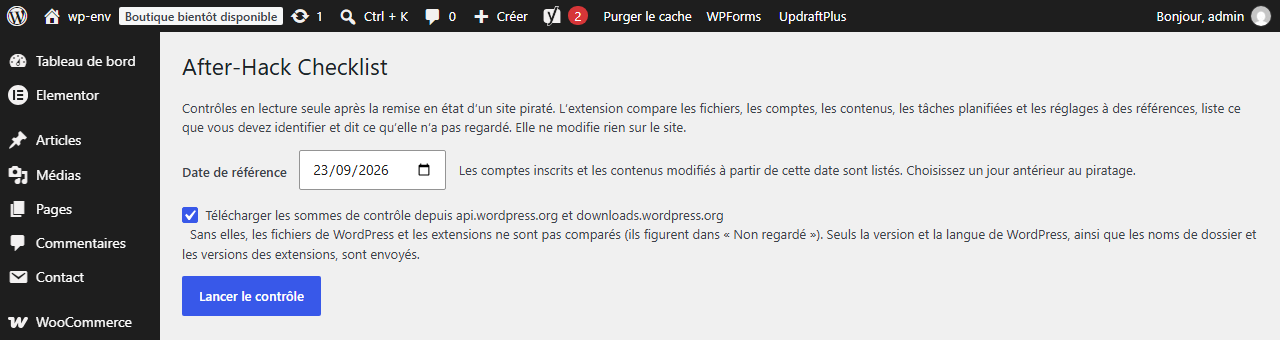
Under Tools > After-Hack Checklist: a reference date (30 days ago by default), a box to allow the checksums to be downloaded from WordPress.org, unticked at the start, and the "Run the check" button. The check moves forward in small steps, with a progress bar, and resumes where it stopped if the page is closed.
Text illustration of a report. The exact labels on screen may differ.
2 anomalies, 1 suspect, 4 to identify, 6 points not looked at

Uploads folder
  anomaly       wp-content/uploads/wp-load-8009.php
                PHP file in the uploads folder

WordPress core
  anomaly       wp-includes/wp-theme-core.php
                not listed in the official checksums of WordPress 7.1.3 (fr_FR)

Administrators
  suspect       account "support-wp", created after 2026-09-23

Contents
  to identify   3 pages changed since 2026-09-23

Not looked at
  themes: WordPress.org publishes no checksums for them
  plugin "exemple-premium": no published checksums
  ...
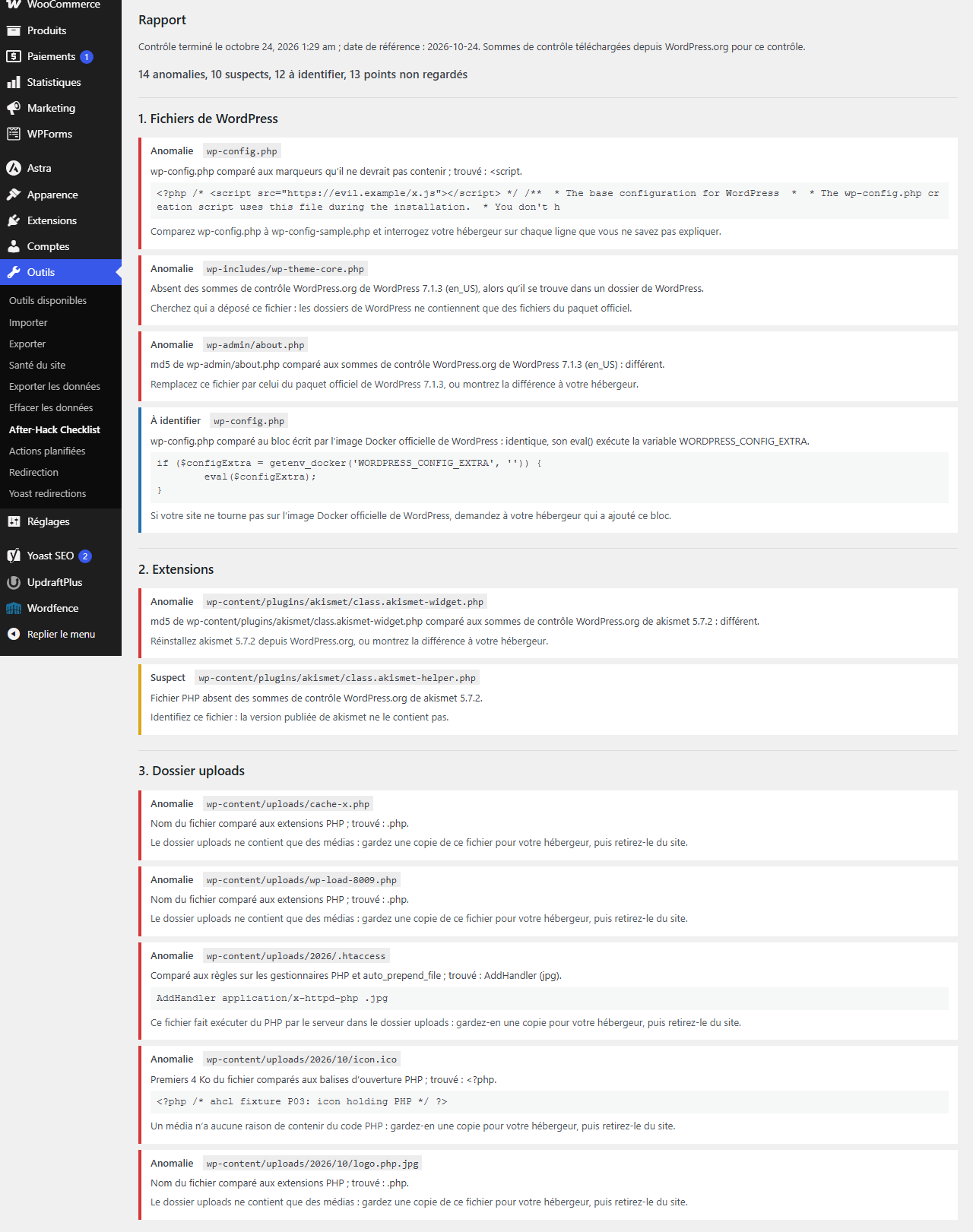
Three levels of finding:
- anomaly: a proven difference from a reference (a checksum that differs from the WordPress.org one, a PHP file in
uploads); - suspect: a pattern common in hacks, which also has normal uses (a script in a widget, an administrator created after the date);
- to identify: an item that only you can recognise (a must-use plugin, a drop-in, a page changed since the date).
For each finding, the report says what you can check by hand, or show to your host.
The ten checks
- Core files compared with the official checksums of your version and your locale; unknown files in
wp-adminandwp-includes; unusual code inwp-config.php. - Plugins from WordPress.org compared with the checksums published for their version.
- PHP files in
uploads, including disguised ones (photo.php.jpg),.htaccessand.user.inifiles. - Must-use plugins and drop-ins, with their header, their size and their date.
- Administrator accounts, accounts created since the date, capabilities granted outside a role.
.htaccessrules: redirects to another site, different pages for search engines, non-PHP files run as PHP.- Contents created or changed since the date, external scripts and iframes in the contents.
- Scheduled tasks whose code lives in
uploadsor outside WordPress. - Site addresses, open registration with a high-capability role, active plugins that cannot be found, scripts in the options and the widgets.
- The list of what was not looked at.
What it does not look at
This list is at the end of every report.
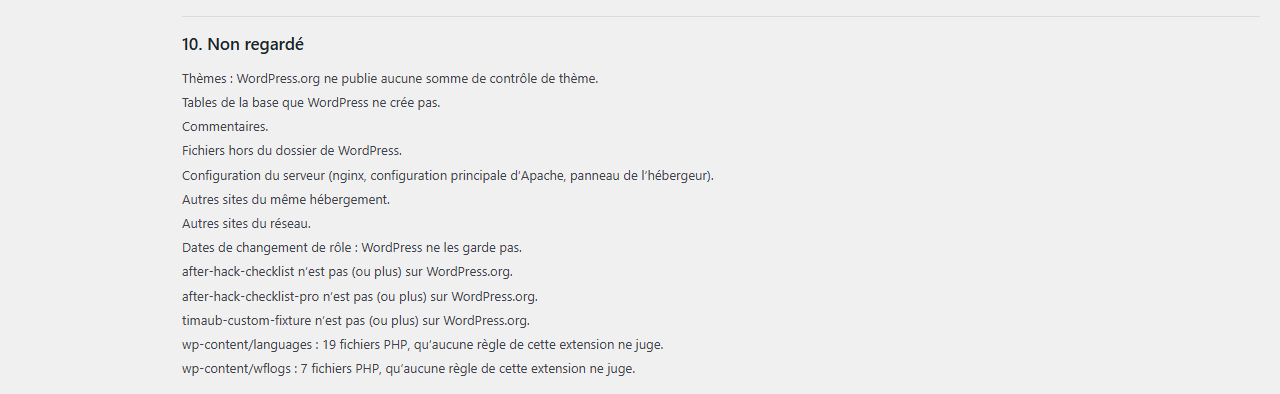
- Themes: WordPress.org publishes no checksums for them.
- Plugins without published checksums (premium plugins, plugins that are not on WordPress.org, some versions), named one by one.
- The core and the plugins if the checksums could not be downloaded (box unticked, network error), with the reason.
- The database tables that do not belong to WordPress, and the comments.
- The files outside the WordPress folder, the server configuration, the host's control panel.
- The other sites on the same hosting, and the other sites of a multisite network.
- The date of a role change: WordPress does not keep it.
- Unreadable files (counted, the first 50 listed) and files larger than 5 MB.
Free and Pro
| Feature | Free | Pro |
|---|---|---|
| The ten checks, on demand, report on screen, without limit | Yes | Yes |
| Reference snapshot and "Changed since the snapshot" section | No | Yes |
| New scheduled check, every day or every week, e-mail only for a new anomaly or suspect finding | No | Yes |
| Export of the report as printable HTML | No | Yes |
| External calls | WordPress.org checksums, if you tick the box | In addition: license and updates (Freemius) |
| Price | Free | €39 excl. VAT, paid once, for 1 site |
The Pro is a separate plugin, installed next to the free one. Nothing in the free plugin is time-limited or locked. Full refund within 14 days, with no conditions.
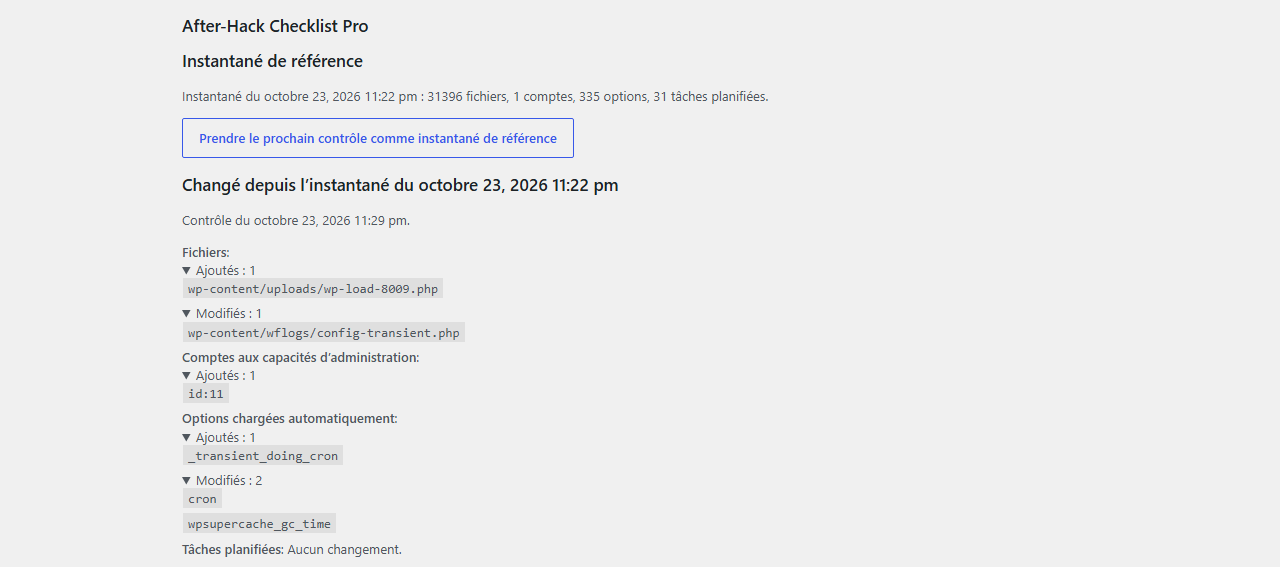
Pro available soon.
Questions
Does it change my site?
No. It reads the files, the accounts, the contents, the settings and the scheduled tasks, and writes only its own options. To act on a finding, you are the one who does it, over FTP, in the administration or with your host.
Will it tell me the hack is over?
No. It says what it found where it looked, with a level for each finding, and where it did not look. Zero anomalies only means that these ten checks found no proven difference.
I already ran a scanner. What does this add?
The plugin has no signature list. It compares the files with the official WordPress.org checksums and lists what you have to recognise: administrator accounts, must-use plugins, drop-ins, recent contents, scheduled tasks, .htaccess rules, settings. It replaces neither a scanner nor the help of your host.
Does it contact outside servers?
Only if you tick the box, unticked at the start. It then asks api.wordpress.org for the core checksums (with your version and your locale), and downloads.wordpress.org for those of each installed plugin (folder name and version). Nothing is sent to the publisher. Details: privacy.
My hosting is shared (IONOS, OVH…). Will the check stop halfway?
Each step works for about fifteen seconds, then the page starts the next one. If the page closes, open it again and choose "Resume".
What do I need?
WordPress 6.8 or later, PHP 7.4 or later, an administrator account.
Security and privacy
Have you found a vulnerability in the plugin? Write to security@timaub.fr. The same contact is published in /.well-known/security.txt (RFC 9116). First reply within 5 working days; confirmed vulnerabilities are fixed in a new version, and the people who found them are credited if they wish. Please give us the time to publish the fix before you speak about it publicly.
This page loads no script, no font and no external tracker. Details of the data: privacy.