Projects / Construction company website with a map of its job sites
Business websiteConstruction company website with a map of its job sites
Twenty projects to filter, a real map of the job sites and a private area where it adds new projects.

The need
A construction company wants a high-end website to show its projects to property developers, landlords and project managers, with a map of its job sites and an area where it manages its own content.
What I built
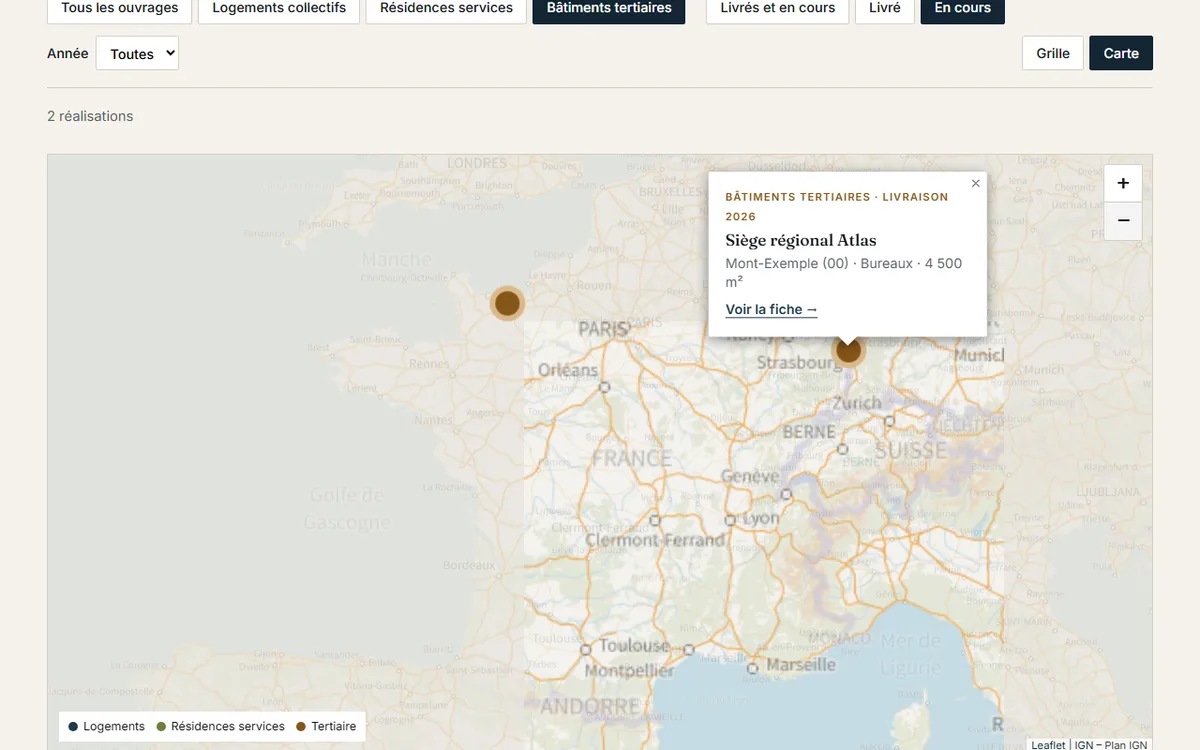
Twenty projects, filtered by type of building, by stage and by year, in a grid or on a map. Each has its own page, with its figures and a small map centered on the job site.
A map of the job sites on the IGN Plan base map, zooming down to street level: one dot per job site, with a popup linking to its page.
A private area: you add a project there, with its photo and its address searched on the map. It shows up right away in the catalog, on the map and on its own page.
Demo built for a job posting: the company, the figures and the job sites are made up, even if the dots land near real towns.
- Leaflet
- IGN Plan base map
Try it in the demo
- Filter the projects by type, then switch to map view: the same buildings become dots.
- On the map of job sites, zoom down to the street and click a dot: its popup leads to the job site's page.
- Open the private area (password: chantier) and add a project by searching for an address: it shows up right away on the map and in the catalog.
What I checked
- The map loads the real IGN Plan base map and zooms down to street level.
- The address search queries the geocoding service of IGN, the French national mapping agency.
- The added photo is resized in the browser before it is saved.
Simulated in the demo
- What you add in the private area stays in your browser: no database, no account. The contact form sends nothing.
Lighthouse: accessibility and SEO at 100, performance between 90 and 94 with the map. The full journey, including adding a project, was run in Chrome and in WebKit, the engine behind Safari.
The demo in screenshots